
Our Verdict
Choose the M2 for a setup that needs no more than two analog inputs and one speaker pair. Choose the M4 to keep a stereo synthesizer connected alongside your microphones, use additional output routing, or adjust the balance between direct inputs and computer playback from a knob.
MOTU M2 vs MOTU M4 (2026) Head to Head
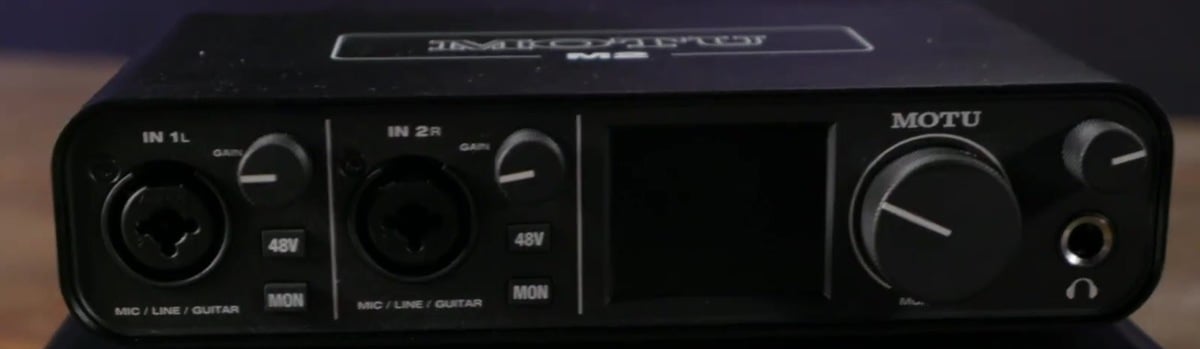
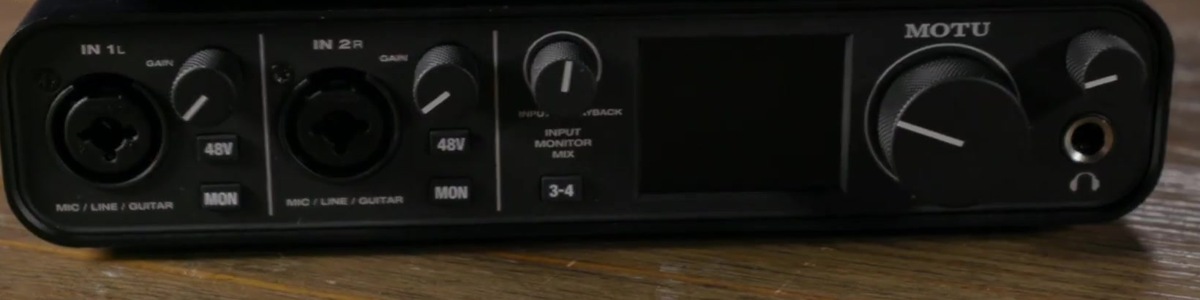
The MOTU M2 and M4 share a straightforward desktop recording approach, with front-panel meters and two microphone preamps. The M4 adds rear line inputs, another output pair and a monitor blend control. The decision is mainly about how much equipment you want connected at once, rather than a different class of microphone recording.
Key Differences
| Feature | MOTU M2 | MOTU M4 |
|---|---|---|
| Simultaneous analog recording channels | 2 | 4 |
| Balanced line output channels | 2 | 4 |
| Front-panel metering | Colour LCD: two inputs and two outputs | Colour LCD: four inputs and four outputs |
Recording more sources: The M2 has two analog input channels; the M4 has four. Its extra rear sockets accept line-level signals, so they suit a keyboard or synthesizer. They are not two extra microphone preamps. For example, an M4 setup can record a vocal microphone, a guitar and a stereo synth together, provided each source uses the appropriate input.
Output routing: The M4 adds outputs 3-4 for another destination from the DAW. That can be useful for routing to external equipment, but you must set up the signal path in your software. The RCA sockets mirror the corresponding outputs rather than creating additional independent channels.
Monitor balance: The M4's Input Monitor Mix knob blends hardware-monitored inputs with computer playback. This is useful when a backing track masks your live performance. The M2 has direct-monitor buttons, but no equivalent blend knob. Set an appropriate listening balance before recording so you can concentrate on the performance.
Key Features in Common
| Feature | MOTU M2 | MOTU M4 |
|---|---|---|
| Microphone preamp count | 2 | 2 |
| Maximum microphone gain | 60 dB | 60 dB |
| Maximum bit depth | 24-bit | 24-bit |
| Maximum sample rate | 192 kHz | 192 kHz |
| Headphone sockets | 1 | 1 |
| 5-pin MIDI | In and Out | In and Out |
| Automatic gain setting | No | No |
| Automatic clipping protection | No | No |
| Input voicing | None | None |
| 48 V phantom-power control | Independent switch for each microphone input | Independent switch for each microphone input |
| Digital expansion | None | None |
| Computer connection | USB-C connector; USB 2.0 protocol | USB-C connector; USB 2.0 protocol |
Both include two mic/line/instrument inputs, independent phantom-power control and 5-pin MIDI input and output. Their colour LCDs show input and output levels. Each provides balanced monitor outputs and one headphone socket with its own volume control. Both offer up to 24-bit/192 kHz recording and USB bus power.
MOTU's M Series driver provides loopback channels for capturing computer playback. Neither interface offers ADAT expansion or an onboard plug-in effects engine. These shared features make the M2 perfectly usable when your session fits its input count.
Practical Buying Considerations
Count microphone inputs separately: If your plan is to record four microphones, the M4's two extra line inputs do not solve that requirement on their own. Choose an interface with enough microphone preamps, or plan appropriate external preamps and connections.
Headphone monitoring: Both have a single headphone socket. The M4's extra line outputs do not add a second built-in headphone amplifier; additional listening stations need suitable equipment.
Computer setup: Check current driver and operating-system support. For software instruments or effects, usable latency depends on the complete computer setup. Test a sensible buffer size with your intended session, rather than treating an advertised latency figure as a guarantee.
Keep it practical: If you record every instrument separately, extra sockets may sit unused. They become more valuable when they let you avoid repeated cable changes or capture a performance with several sources together.
Full Specifications
Comparison essentials
| Feature | MOTU M2 | MOTU M4 |
|---|---|---|
| Simultaneous analog recording channels | 2 | 4 |
| Microphone preamp count | 2 | 2 |
| Maximum microphone gain | 60 dB | 60 dB |
| Maximum bit depth | 24-bit | 24-bit |
| Maximum sample rate | 192 kHz | 192 kHz |
| Balanced line output channels | 2 | 4 |
| Headphone sockets | 1 | 1 |
| 5-pin MIDI | In and Out | In and Out |
| Automatic gain setting | No | No |
| Automatic clipping protection | No | No |
| Input voicing | None | None |
| 48 V phantom-power control | Independent switch for each microphone input | Independent switch for each microphone input |
| Front-panel metering | Colour LCD: two inputs and two outputs | Colour LCD: four inputs and four outputs |
Recording capacity
| Feature | MOTU M2 | MOTU M4 |
|---|---|---|
| Microphone preamps | 2 microphone preamps; up to 60 dB gain; independent 48V buttons | 2 microphone preamps; up to 60 dB gain; independent 48V buttons |
| Analog inputs | 2 combo XLR/TRS mic/line/instrument inputs | 4 channels: 2 combo mic/line/instrument plus 2 rear TRS line inputs |
| Analog outputs | 2 balanced TRS outputs plus mirrored RCA pair; 2 independent channels | 4 balanced TRS outputs plus mirrored RCA sockets; 4 independent channels |
| Headphone outputs | 1 stereo 6.35 mm jack; separate volume; follows outputs 1-2 | 1 stereo 6.35 mm jack; separate volume; follows outputs 1-2 |
| Digital expansion | None | None |
Connection and monitoring
| Feature | MOTU M2 | MOTU M4 |
|---|---|---|
| Computer connection | USB-C connector; USB 2.0 protocol | USB-C connector; USB 2.0 protocol |
| Computer compatibility | Windows with driver; macOS; iOS with suitable USB adapter and power | Windows with driver; macOS; iOS with suitable USB adapter and power |
| Power supply | USB bus power; power switch | USB bus power; power switch |
| Direct monitoring | Per-input MON buttons; mono/stereo; no input/playback blend knob | Per-input MON buttons; mono/stereo; input/playback blend knob |
| Loopback | Loopback and Loopback Mix with M Series driver | Loopback and Loopback Mix with M Series driver |
| Onboard DSP | No onboard plug-in effects engine | No onboard plug-in effects engine |
Software and portability
| Feature | MOTU M2 | MOTU M4 |
|---|---|---|
| Included software | MOTU Performer Lite; Ableton Live Lite; bundled sound content | MOTU Performer Lite; Ableton Live Lite; bundled sound content |
Verdict
The M2 fits a compact two-input recording workflow. The M4 is the stronger fit when extra line sources, output routing or the monitor blend knob address a specific need. Its advantage is connection flexibility, not additional microphone preamps.